How to set the number format?
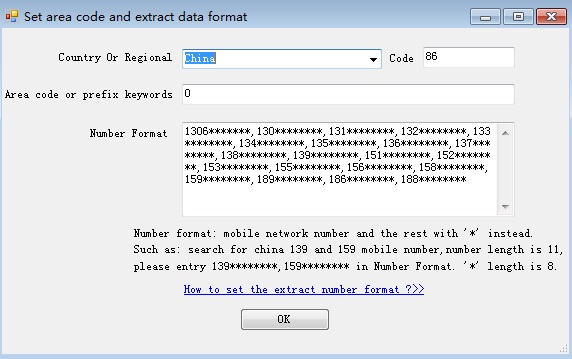
1. Select your Country Or Regional. The Country code will set with default value, if code is wrong, you can change it.
For example, China's code is 86 , if the display number is +86 13943964888, our system will ignore +86 and extract 13943964888. Of course, if the display number is 13943964888, you can extract 13943964888 also.
2. Set Area Code. Such as some country, if you call the number,you need add "0" before the number, because the call is belong to the other regions.
For example, the number is display as 013943964888, if the first number "0" is a Area Code, the real number is 13943964888, your Area Code can set to 0. then our system will ignore the first 0 and extract 13943964888.
if the display number is 13943964888, you can extract 13943964888 also.
3. Number Format
For example, if your number that you need to extract is begin with 689,267,132 or 133, the number length is 11, you can input Number Format 689********,267********,132********,133********.the "*" length is the rest length of the number. all number that begin with 689,267,132 or 133 and the length is 11 will be extracted.
The "-" character and blank are ignore by our system. such as, if the number is display as 132-2312-4542 or 132 2312 4542 will be extracted 13223124542.
If the number includes brackets, such as the number is display as (901) 2312-454 or (877) 4563-445 ,you need input Number Format as (901)*******,(877)*******.
4. All Number Format must be the same length.
5. Extract Fax number or Phone number
If you extract fax number or phone number, area code or prefix keywords is need fill. For example, you want to extract for fax number, if you fill fax|faxes|facsimile, only the number that begin with fax or faxes or facsimile will be extracted. If you fill tel, only the number that begin with tel will be extracted. system ignore ":" symbol.